{{text}}
Share
If you are considering creating a website, especially an online store, you may be wondering which tool to choose between Webflow And Shopify. These two platforms are very popular, but they serve different needs. Webflow is distinguished by its powerful web design capabilities and its CMS, with secondary e-commerce functionalities. On the other hand, Shopify is specifically designed to create and manage online stores, offering advanced e-commerce tools. Moreover, if we are wondering which tool competes with Webflow for showcase sites, the comparison between Webflow vs Wix Could also be relevant.
To make the right choice, analyze your priorities: if you are looking for great design freedom for a visually appealing site, Webflow It is a great option. However, if your main objective is to manage an online store with powerful tools and simplified integration, Shopify is probably more appropriate.
In this article, we'll detail the strengths of each platform to help you decide.
Ease of use and user experience
Webflow user interface
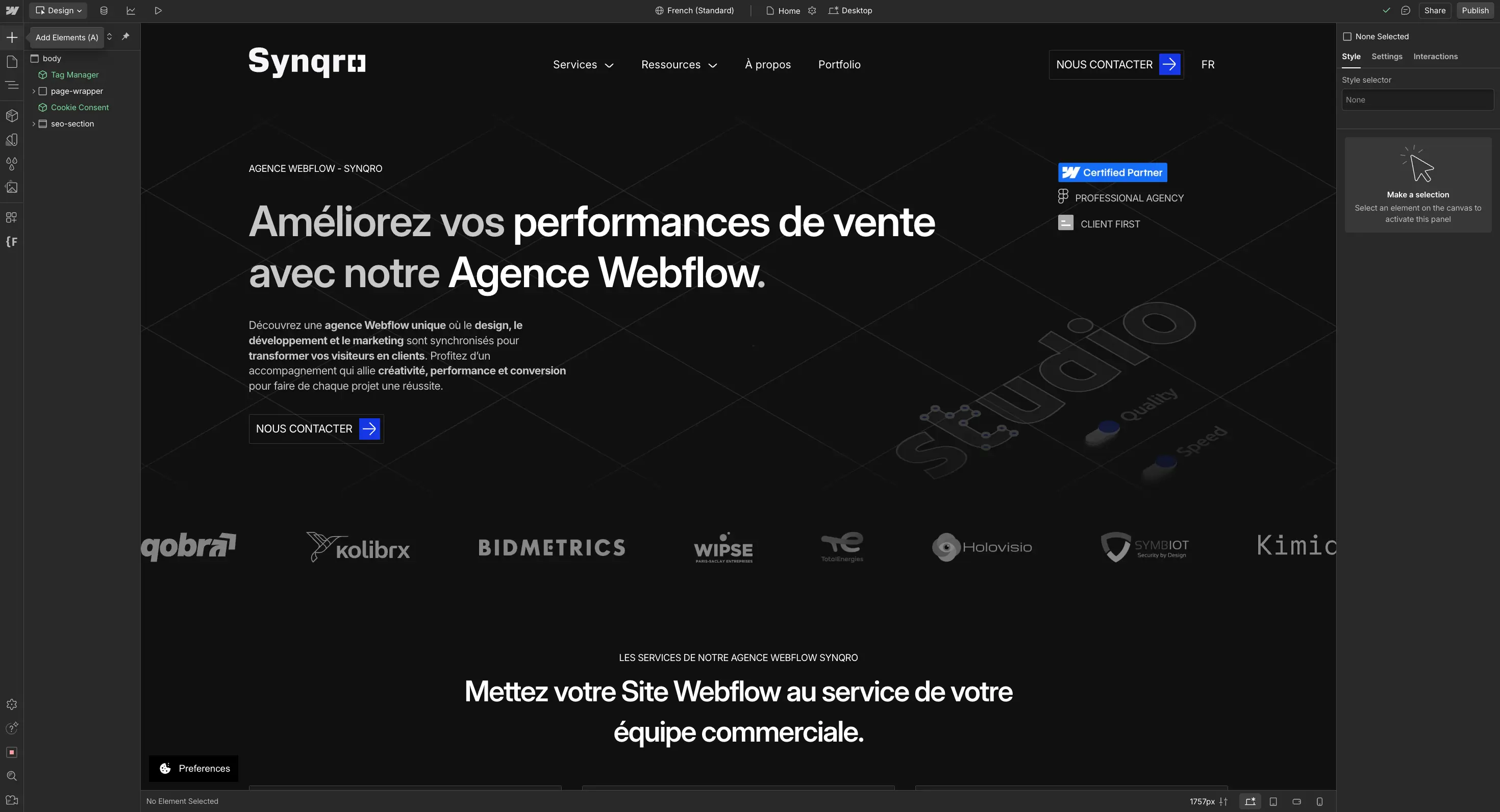
The user interface of Webflow is specially designed for design professionals and web developers. It offers a Great flexibility, but comes with a more demanding learning curve. Webflow's visual editor allows for very detailed customization, making it a great choice for those who want to create designs Uniques and visually appealing. In this context, creators are also exploring alternatives such as Framer vs Webflow, due to different approaches to content creation.
However, this complexity can discourage users with no experience in web design or development. Setting up an online store on Webflow requires several steps: selecting a template, customizing the design, configuring the CMS, adding products and setting up e-commerce options. This process can be Time-consuming and demanding.
Shopify user interface
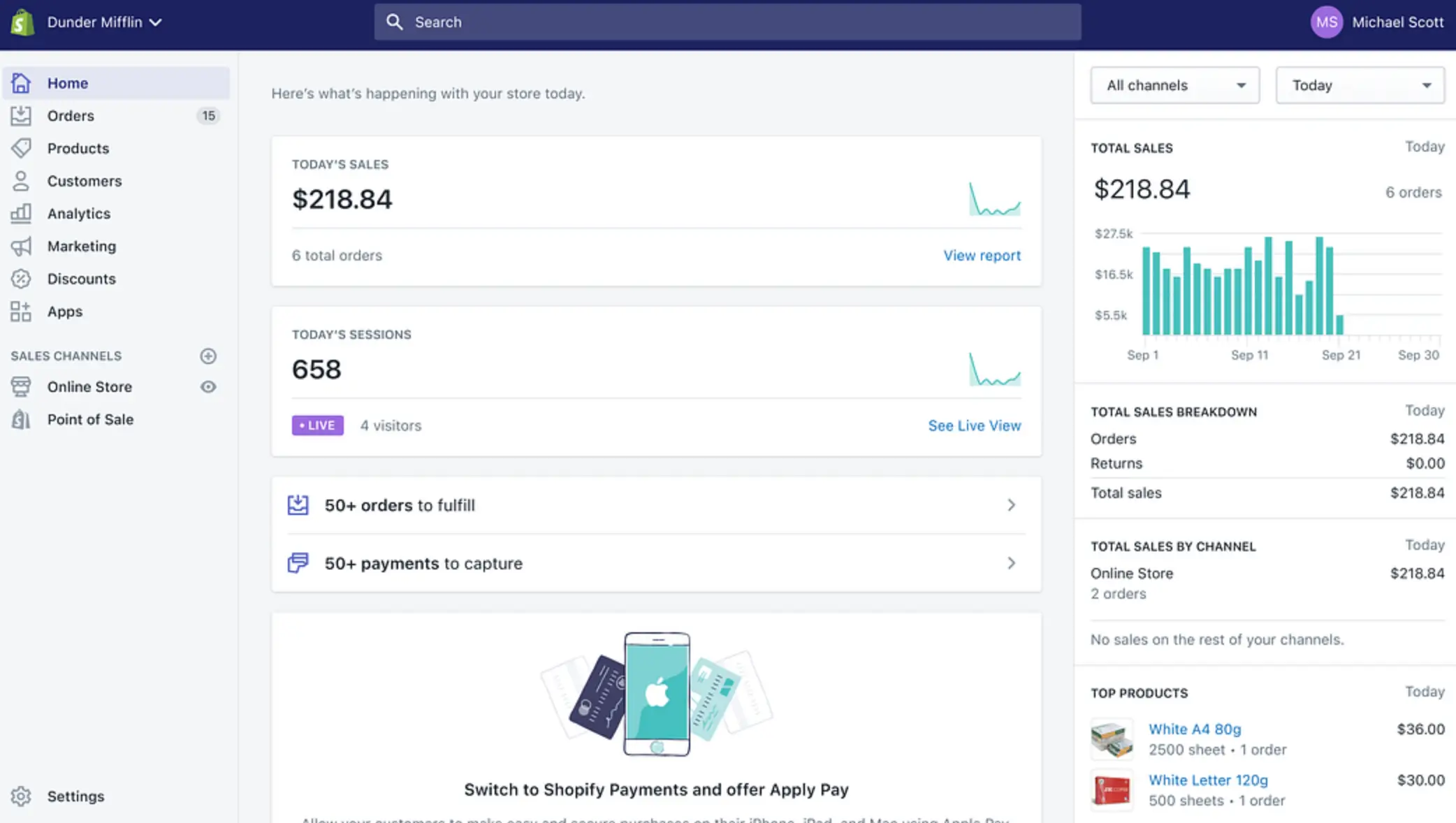
Shopify, on the other hand, is known for its user interface. Intuitive and friendly. It considerably simplifies the creation and management of an online store. Even newbies with no technical skills can quickly get up to speed with the platform to add products, manage orders, and set up delivery options.
Shopify offers a selection of pre-designed themes that can be customized to a certain extent. Although less flexible than Webflow in terms of design, this approach makes it easier to set up and manage an online store, making Shopify accessible to an audience. Very Wide.
Comparing the Learning Curve
The learning curve is a key factor in considering when it comes to choosing between Webflow and Shopify. Webflow requires more time to adapt, especially for users who are not familiar with web design or development. It generally takes an extended period of time to fully exploit its advanced tools and customization capabilities.
On the other hand, Shopify is distinguished by its ease of learning. Its clean interface and well-organized features allow users to understand the basics in just a few days. Advanced Features Can Be Mastered in a Few Weeks, Making It a Solution Ideal For those looking for a quick start.
Design and customization
Customization capabilities with Webflow
Webflow Offer a Almost Unlimited Design Freedom, making it an ideal solution for those who want to create unique and highly personalized websites. Thanks to its visual editor, you can adjust every element of your site, from the HTML structure to advanced CSS styles and dynamic interactions. Some specialized businesses, such as a Webflow agency, can support in this approach by exploiting the potential of the platform.
This flexibility makes it possible to design tailor-made sites, without technical constraints. You can customize each pixel and even add specific code for specific features.
The models offered by Webflow, although fewer in number than those of other platforms, stand out for their High quality and their great capacity for customization. This makes it easy to create sites that stand out and perfectly reflect your brand identity. In addition, Webflow makes it possible to create complex animations and dynamic interactions without requiring coding skills. This is a major asset for businesses or individuals looking for specific and scalable designs.
Customization capabilities with Shopify
Shopify, although less flexible than Webflow in terms of design, still offers numerous customization options for online stores. You can choose from a wide variety of pre-designed themes that can be edited to match your brand identity.
Shopify also allows you to add customization options for products, such as text fields, drop-down menus, checkboxes, and file uploads, thus enriching the user experience for your customers.
However, customization on Shopify may be limited by the themes chosen. Further changes often require coding skills or the use of third-party applications. Tools like Smart Product Options gold Infinite Options Can extend customization capabilities, but they add an additional layer of complexity.
Comparing template options and design flexibility
By comparing template options and design flexibility between Webflow and Shopify, Webflow Stands Out By its ability to offer total control over design. Webflow users can create fully customized websites without being restricted by rigid structures. Conversely, Shopify offers customizable themes, but they have inherent limitations.
Shopify Shines for Its Simplicity and its speed of implementation. Pre-designed themes allow you to quickly customize an online store to meet basic needs. However, for those looking for a more advanced and flexible design experience, Webflow — or even a combination of Webflow and Shopify via solutions like Shopyflow — represents a more comprehensive and customizable alternative.
In summary, the choice between Webflow and Shopify depends on your design and customization priorities. If you value a Maximum flexibility and total control over the design, Webflow is the best choice. On the other hand, if you prefer a quick and simple solution with robust e-commerce functionalities, Shopify will better meet your expectations.
E-commerce features and integrations
Online selling options with Shopify
Shopify offers a Full Range of E-Commerce Features to simplify online sales. One of its main advantages lies in its ability to manage automatically The Inventory, orders and deliveries. The platform also includes Powerful Tools for Automatic calculation of delivery costs and taxes, as well as reminders for abandoned carts, helping to reduce potential sales losses.
Shopify allows sales via multiple channels, such as online marketplaces, social networks, and physical points of sale thanks to Shopify POS. In addition, options like the Dropshipping and print-on-demand are expanding opportunities for retailers.
Payment integrations are robust, with support for multiple gateways such as Shopify Payments, PayPal, and Apple Pay. These secure solutions ensure a smooth and reliable payment experience for customers.
Online Selling Options with Webflow
Although Webflow is less specialized in e-commerce than Shopify, it nevertheless offers Solid Features for online sales. The platform allows the creation of fully customizable online stores, with flexible options for product management, including variations, descriptions, categories, and custom fields. In addition, when exploring more traditional CMS uses, the analysis of the relevance between Webflow vs WordPress becomes essential to determine the specific advantages of each system.
Webflow also integrates tools for automatic tax calculation, abandoned cart recovery, and SEO optimization, which improves visibility and conversions. On the payment side, the platform supports several secure solutions, including Stripe, PayPal, and Apple Pay, while offering customizable delivery options, whether physical or digital deliveries.
In addition, Webflow makes it easy to integrate with third party services like Shippo for shipping management, QuickBooks for accounting, and MailChimp for email marketing, simplifying the overall sales management process.
Integrations and plugins for both platforms
Both Shopify and Webflow allow integrations with third party tools to enrich their functionalities. Shopify stands out for its vast app store, which offers solutions for inventory management, marketing, and advanced analytics. These applications can be easily installed and configured to meet the specific needs of each online store.
Webflow, for its part, offers integrations via APIs and plugins, allowing to extend its e-commerce capabilities. For example, integration with services like Shippo for shipping or Printful for print-on-demand is easy and effective.
Additionally, Webflow can be connected to marketing tools like MailChimp or accounting systems like QuickBooks, making it easy to manage the overall business. Finally, solutions like Builder.io allow Shopify to be integrated with other platforms and tools, offering greater flexibility and scalability for merchants using multiple solutions.
Price Comparison between Webflow eCommerce and Shopify: What is the Best Value for Money?
When looking to create an online store, cost is a key factor in choosing the platform. Shopify and Webflow offer different pricing models, adapted to various needs and budgets. This section compares Shopify and Webflow eCommerce pricing in detail to help you choose the best solution based on your goals and budget.
1. Shopify Pricing: Transparency and Simplicity
Shopify takes a clear and progressive approach to pricing, with three main pricing plans:
- Basic Shopify — $39/month
- Shopify Standard — $105/month
- Advanced Shopify — $399/month
Each plan offers a set of features tailored to the size and needs of your business. Here is an overview of the differences between these plans:
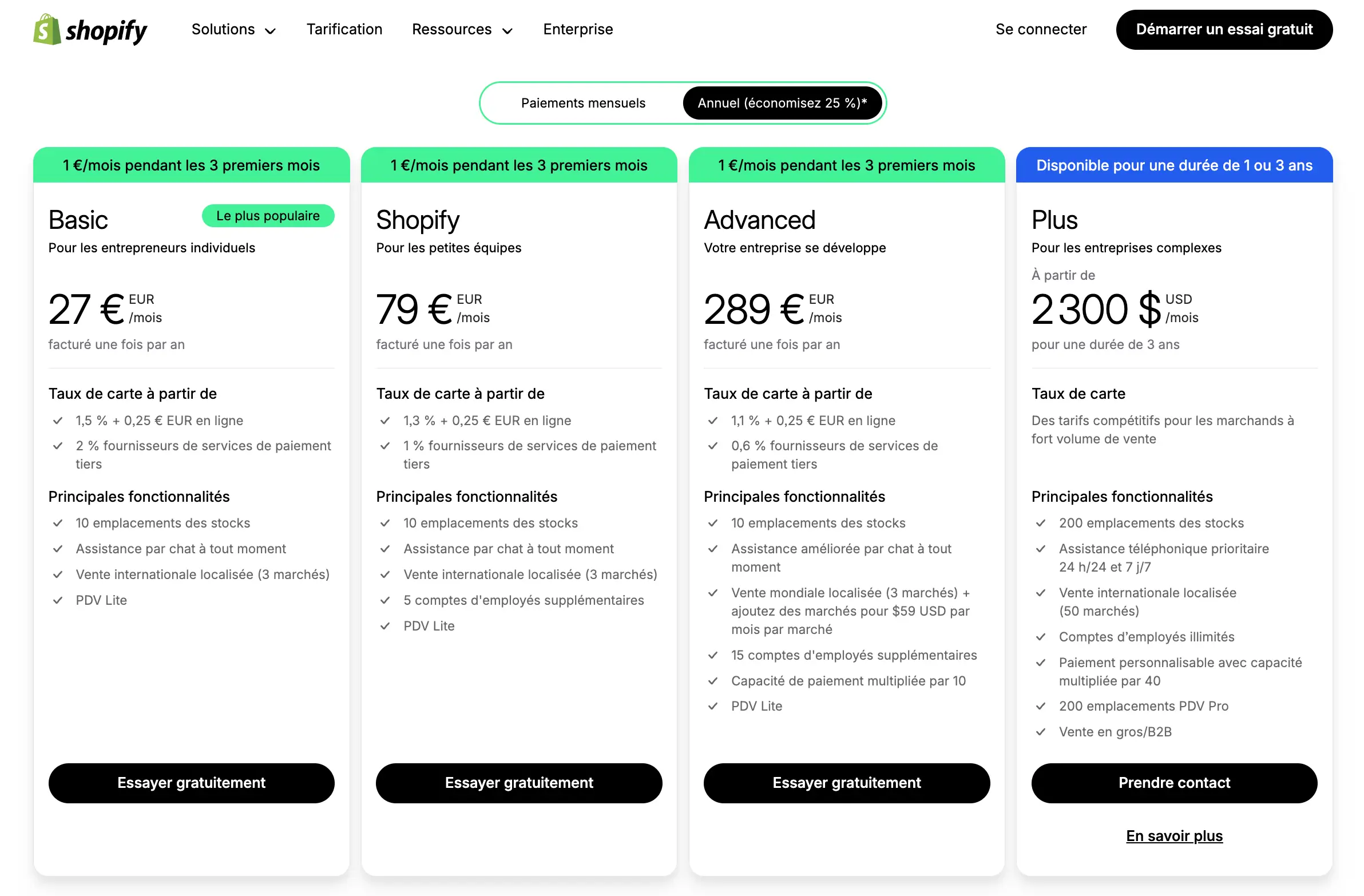
🔹 Basic Shopify ($39/month)
- Great for small businesses or entrepreneurs who are just starting out.
- Includes a website with a blog, an unlimited number of products, and the ability to sell on multiple channels (Facebook, Instagram, etc.).
- 24/7 customer support.
- Transaction fee: 2.9% + $0.30 per online transaction.
🔹 Shopify Standard ($105/month)
- Suitable for growing businesses.
- Includes all the features of the Basic plan, plus professional reports, gift cards, and reduced transaction fees (2.6% + $0.30).
- Allows you to add up to 5 staff accounts.
🔹 Advanced Shopify ($399/month)
- Intended for large-scale businesses.
- Offers advanced reports, shipping rates calculated in real time, and even lower transaction fees (2.4% + $0.30).
- Access to up to 15 staff accounts.
Other costs to consider on Shopify
- Custom domain : starting at $14/year.
- Premium themes : between $100 and $350.
- Third-party applications : some free, others paid ($10-100/month).
- Shopify Plus (enterprise offer): starting at $2,000/month for advanced needs.
2. Webflow eCommerce Pricing: Flexibility and Customization
Webflow offers three eCommerce packages that allow you to sell online, each adapted to a specific type of business:
- Standard — $42/month
- Plus — $84/month
- Advanced — $235/month
Here is a comparison of the various options offered:
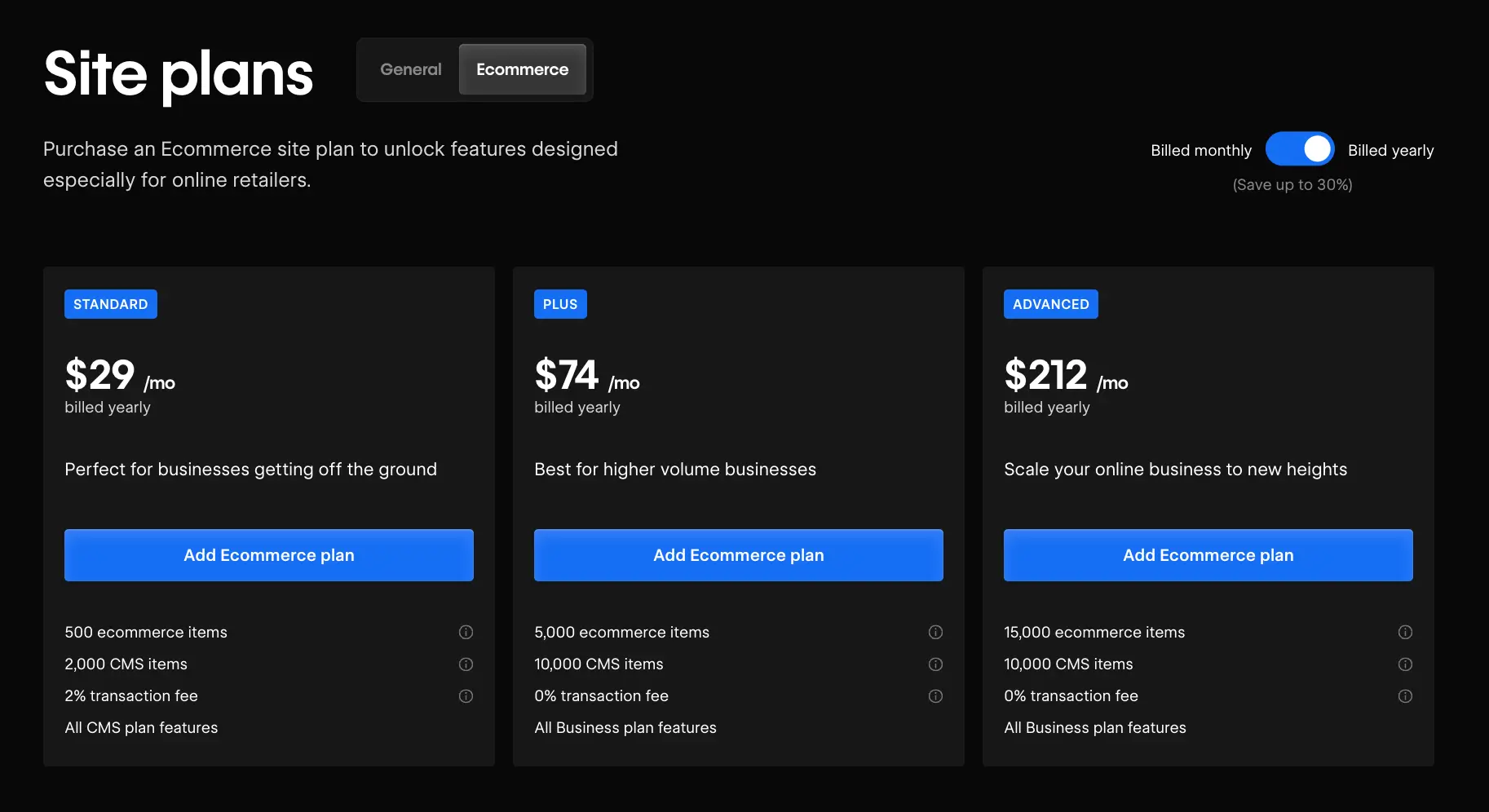
🔹 Standard ($42/month)
- Suitable for small businesses that sell up to 500 products.
- Transaction fees of 2% on each sale (in addition to Stripe or PayPal fees).
- Payment integration via Stripe and PayPal only.
- Customization of the checkout and the basket, but limitations on subscriptions.
- Up to 3 staff accounts.
🔹 Plus ($84/month)
- Great for growing businesses.
- No Webflow commission on transactions.
- Limit increased to 1,000 products.
- Up to 10 staff accounts.
- Priority support.
🔹 Advanced ($235/month)
- Adapted to large businesses.
- Up to 3,000 products sold online.
- All the features of the lower plans.
- No limit on the volume of annual sales.
Other costs to take into account on Webflow
- Custom domain : about $15/year.
- Premium models : between $50 and $150.
- Stripe or PayPal transaction fees : 2.9% + $0.30 per transaction.
- Addition of advanced features via Zapier, Memberstack or Foxy.io (external paid services).
FAQ: Webflow vs Shopify
What is the best platform between Webflow and Shopify for an online store?
Shopify is the best commerce platform for a classic online store. It natively offers all the essential functionalities: stock management, accept payments, abandoned cart recovery, marketing tools and access to a App Store rich. Webflow may be suitable for a store with a small catalog and a strong visual identity, but it is not designed for large-scale e-commerce operations. If your main objective is to create a store efficient and capable of generating transactions, Shopify clearly stands out. Webflow remains relevant for projects where design takes precedence over sales volume.
Can Webflow replace Shopify to sell online?
Webflow can cover simple e-commerce needs, but does not replace Shopify for ambitious projects. Webflow ecommerce allows you to manage products, orders and payments via Stripe, but advanced features such as recovery of abandoned carts, complex delivery options or logistical integrations remain limited. Webflow offers a viable e-commerce solution for brands with a limited catalog and a premium positioning. On the other hand, as soon as the volume of products increases and the need for automation are becoming more complex, Shopify is taking advantage again. Les two platforms can also coexist in a hybrid architecture.
What are the transaction fees on Webflow and Shopify?
Les transaction fees vary depending on the plans and payment gateways used. Shopify charges between 0.5% and 2% depending on the plan if you're not using Shopify Payments. With Shopify Payments, these fees are waived. Webflow does not apply transaction fees on its paid e-commerce plans, but allows you to calculate the total costs by integrating product limits and restrictions according to packages. It is essential to compare two platforms on the total monthly cost, including third-party apps, premium themes, and potential transaction fees.
Webflow or Shopify: which tool is easier to use?
Which tool to choose depends on your profile. Shopify is designed to be accessible from day one, even without technical knowledge. Its guided interface allows you to launch A store functional in a few hours. Webflow, on the other hand, requires longer learning. Webflow is a constructor powerful visual, but primarily aimed at designers and creative teams. Webflow University is a valuable resource for developing skills, but the investment time is real. If you are looking the tools needed to create quickly your store without outside help, Shopify is clearly more suitable for non-technicians.
Can Webflow and Shopify be used together?
Yes, and it is an architecture that is increasingly adopted by brands that want the best of two platforms. Concretely, a Webflow website serves as an editorial showcase and content hub, while a Shopify store manages all transactions. This approach makes it possible to You can choose the creative freedom of Webflow for brand experience, while benefiting from the market power of Shopify for conversion. Shopify includes integration options that facilitate this combination, in particular via purchase buttons that can be integrated into any website. It is a relevant option for high-end brands.
Is Webflow suitable for advanced e-commerce?
Webflow is a platform designed primarily for the creation of visual websites, and not for ecommerce advanced. Its e-commerce functionalities remain relevant for projects with a limited catalog and simple sales flows. On the other hand, for needs more complex such as multi-warehouse management, advanced loyalty programs or the management of unlimited number of products with numerous variants, Shopify and its range Advanced or Shopify Plus are much more suitable. Webflow has knew how to position itself as a reference tool for creatives, but Shopify has is building the most robust e-commerce infrastructure on the market for growing merchants.
Conclusion
In summary, the choice between Webflow And Shopify Depends Largely On Your Objectives And Specific Needs. If you are looking for a platform to create an online store with Robust e-commerce features, advanced inventory management tools, and easy integration with various third-party services, Shopify stands out as the best option. However, if you attach great importance to the Design flexibility, detailed customization and a unique user experience, Webflow is ideal, especially for projects where the design And the Happy are essential.
It is also possible to combine Webflow and Shopify thanks to the integration of the two platforms. This can offer the best of both worlds: effective e-commerce management with Shopify and Advanced Customization design thanks to Webflow.
In the end, take the time to think about your needs for design, e-commerce features, and Usability. Feel free to test both platforms if possible, and choose the one that best fits your vision And to you Business Goals.
Synqro's latest achievement